
Table Of Contents
- Why Every Small Firm Needs an IT Roadmap
- Start With a Clear View of the Current Setup
- Connect Technology Plans to Business Goals
- Set the Security Basics First
- Create Reliable Hybrid Work Systems
- Organize Cloud Tools and Business Data
- Support People With Better Processes
- Rank Projects by Value and Risk
- Build a 12-Month Technology Timeline
- Track Results and Update the Plan
- Common Questions About IT Roadmaps
- Conclusion
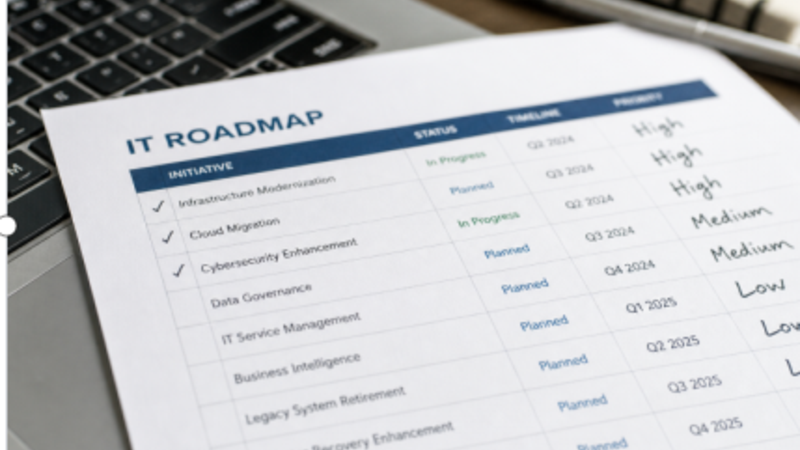
Small and midsize organizations do not need a massive technology strategy document to make smarter decisions. They need a clear, usable plan that connects daily work, security, budget, and growth. A dependable Network Security Management approach can provide an important foundation by helping leaders understand where systems, data, and access controls need attention. An IT roadmap turns scattered requests, recurring support issues, and unplanned purchases into a sequence of manageable improvements. Instead of reacting only when a device fails or an employee needs another software subscription, the business can prioritize projects based on operational value and risk.
Why Every Small Firm Needs an IT Roadmap
Without a roadmap, technology decisions often happen only after something breaks. That can lead to downtime, duplicate software, inconsistent workflows, and rushed spending. A practical roadmap gives each improvement a purpose, an owner, a target date, and a realistic budget. For example, a professional services firm may repeatedly struggle with file access, forgotten passwords, and slow employee setup. Rather than buying several new tools at once, it can standardize accounts, improve secure file sharing, document onboarding, and schedule the work in phases. The result is less disruption and more predictable progress.
Start With a Clear View of the Current Setup
Before selecting new technology, document what already exists. Review employee devices and operating systems, cloud applications and licenses, office internet and networks, data storage, backups, user accounts, remote work tools, vendor contracts, and support arrangements.
Create a Simple System Inventory
For every important system, record the following details in a shared document:
- System:The application, device group, or service being reviewed.
- Owner:The person responsible for business decisions about it.
- Business purpose:The work it supports and the teams that use it.
- Known issue:A security gap, cost concern, support problem, or workflow delay.
- Next action:The specific review, fix, renewal decision, or replacement step required.
Connect Technology Plans to Business Goals
Technology projects should solve real business problems, not simply add features. Ask which tasks slow employees down, where clients encounter delays, which systems cause manual reentry, what information must be available from multiple locations, and what risks could interrupt operations.
A project deserves priority when it improves speed, service quality, accuracy, compliance, or business continuity. Replacing an unreliable internet connection may matter more than introducing a new reporting dashboard if staff cannot consistently access the systems they already need.
Set the Security Basics First
Security is not one product or an annual checklist. It is a set of habits, safeguards, and review practices that reduce the chance that a single mistake becomes a major disruption. The small-business quick-start guides from NIST can help firms frame cybersecurity as a business risk-management responsibility rather than a purely technical task.
Core Safeguards To Include
- Require multifactor authentication for email, financial, administrative, and cloud accounts.
- Apply operating system, browser, and application updates promptly.
- Use strong password practices and separate access by job responsibility.
- Maintain reliable backups and test whether files can actually be restored.
- Protect devices with encryption, endpoint protection, and remote wipe capabilities.
- Train employees to recognize phishing, fraudulent payment requests, and social engineering.
- Write down who should be contacted and what should happen after a suspected incident.
Create Reliable Hybrid Work Systems
Hybrid work gives employees flexibility, but it also spreads devices, accounts, and sensitive information across homes, client sites, and travel locations. Establish clear rules for company-owned and personal devices, secure application access, video meetings, home network expectations, and lost-device reporting. Teams also need one approved file-sharing platform and one central communication channel. A consistent approach reduces confusion about where current documents belong and helps prevent important information from being copied into personal accounts or unapproved applications.
Organize Cloud Tools and Business Data
Every cloud service should have a defined purpose. For each tool, identify who uses it, what process it supports, what data it stores, who can access that data, what other systems it connects to, and how information can be exported if the provider becomes unavailable. Tool sprawl creates unnecessary costs and risk. When several applications store the same customer details or files, employees may use outdated information, access rights become harder to manage, and business owners lose visibility into where important data resides.
Support People With Better Processes
Good technology depends on repeatable processes. Keep procedures short, readable, and easy to find. Useful documents include new-hire account setup checklists, employee departure steps, device replacement instructions, software approval rules, backup testing schedules, incident reporting guidance, and remote work expectations. Short procedures are more likely to be followed than lengthy policy documents. They also make the business less dependent on a single employee to remember every step in a complicated or stressful situation.
Rank Projects by Value and Risk
Use a simple priority score to decide what comes first. List the problem, estimate the cost of leaving it unresolved, rate its security value, consider effort and budget, and note any client, contractual, or legal requirements.
- High priority:Urgent security weaknesses, unsupported systems, missing backups, or risks that could stop operations.
- Medium priority:Projects that reduce repeated manual work, improve client response times, or simplify support.
- Lower priority:Long-term improvements that offer value but have no immediate security or operational impact.
Build a 12-Month Technology Timeline
- Months 1 to 3:Audit systems, remove unused accounts, update devices, and confirm backup coverage.
- Months 4 to 6:Improve access controls, standardize collaboration tools, and train employees.
- Months 7 to 9:Review network performance, automate repetitive work, and test incident procedures.
- Months 10 to 12:Measure results, assess vendor performance, and prepare next year’s priorities.
The schedule should remain flexible. A serious vulnerability, system failure, acquisition, office move, or rapid hiring period may require leaders to change the order of planned work.
Track Results and Update the Plan
Review the roadmap regularly using practical indicators such as support resolution time, open security findings, backup recovery results, training completion, downtime, unused licenses, onboarding speed, and the number of critical systems without an assigned owner. The goal is not to collect endless data. It is to confirm that technology is becoming safer, simpler, more reliable, and more useful for the people who depend on it.
Common Questions About IT Roadmaps
How long should an IT roadmap be?
A short plan with clear owners, dates, and priorities is usually more effective than a long document filled with technical language.
How often should it be updated?
Conduct a formal review at least twice each year, with smaller updates after significant business, staffing, vendor, or technology changes.
Should security come before new features?
Yes, when a weakness could expose sensitive data, disrupt operations, or create a material client or compliance risk.
Can a small business create a roadmap without a full IT department?
Yes. Begin with an inventory, risk list, project priorities, and a basic timeline. External support can help when the environment is highly regulated, complex, or rapidly evolving.
Conclusion
A practical IT roadmap helps small firms make calm, informed technology decisions. By understanding the current environment, addressing core risks, supporting hybrid teams, organizing cloud tools, and measuring progress, a business can build a plan that stays useful as its needs change.